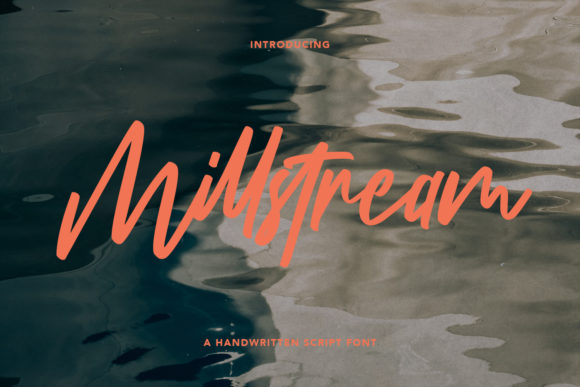
Millstream: The Elegant Handwritten Font for Makers
The afternoon light was filtering through the window, casting a soft glow over my worktable scattered with wax samples, blank labels, and a half-finished sketchbook. I was in the middle of rebranding my small candle line, trying to find the perfect balance between rustic charm and modern sophistication. I had tried several script fonts, but they all felt either too stiff or overly decorative, lacking that genuine human touch. Then, I loaded Millstream into my design software. As I typed "Lavender & Rain" onto the digital label mockup, something clicked. The curves flowed naturally, mimicking the stroke of a real pen, yet it held enough structure to look professional. It wasn't just a font; it was the missing piece of my brand identity.
Bringing Millstream to Life on Physical Products
There is a distinct magic in seeing a digital typeface transform into a physical object. When I first printed test runs of the new candle labels using Millstream, the texture of the paper seemed to interact beautifully with the ink. The font's elegant strokes didn't bleed or lose definition, even on slightly textured cardstock. This is crucial for handmade sellers who rely on tactile quality to justify their price points. Whether you are designing product labels for soaps, creating wedding invitations for a client, or crafting greeting cards for the holiday season, the visual personality of your text speaks before the customer ever reads the words.
I found myself reaching for Millstream again when preparing a batch of boutique tags for a local artisan fair. The font's natural flow made the simple phrase "Handmade with Love" feel personal and intimate, as if each tag were written by hand for that specific buyer. For makers using cutting machines like Cricut or Silhouette, this kind of handwritten font can elevate a standard vinyl decal from a generic sticker to a premium design element. I tested it on a small set of planner stickers, and the intricate loops and swashes cut cleanly without any jagged edges, proving its versatility across different production methods.
Designing with Mood and Brand Consistency
In the world of creative entrepreneurship, your brand identity is everything. A mismatched typeface can confuse customers, while a cohesive one builds trust. Millstream offers a mood that is both warm and refined, making it an excellent choice for brands that want to appear approachable yet high-end. I noticed that when I used it consistently across my packaging, social media graphics, and shop banners, my listings began to feel more unified. The font acts as a visual anchor, tying together disparate elements like packaging design, web design headers, and editorial design for product descriptions.
Consider the emotional appeal of your products. If you sell wedding stationery, the romantic, flowing lines of Millstream evoke feelings of celebration and elegance. For farmhouse signs or tote bags, it adds a touch of artisanal warmth that contrasts nicely with bold, blocky letters. I recently designed a set of printable wall art featuring motivational quotes, and the font transformed simple text into gallery-worthy pieces. The perceived quality of the final product increased simply because the typography looked intentional and carefully chosen. This is the power of a well-selected premium font; it signals to the customer that you care about the details.
Practical Tips for Using Millstream in Your Projects
While Millstream is stunning, it is important to use it strategically. Like most beautiful script fonts, it shines best when used for short phrases, names, titles, or decorative wording. I learned early on not to use it for long paragraphs of body text, especially on small items like product labels or stickers. Readability is key. On a tiny candle jar, a large, elaborate script might become illegible. Instead, I paired Millstream for the product name with a clean sans serif font for the ingredients list and usage instructions. This font pairing creates a hierarchy that guides the eye and ensures the message is clear.
When working with cutting machines, always check the size of your design. Intricate swashes and ligatures in Millstream are wonderful, but they require a bit of space to breathe. For very small applications, such as business cards or hang tags, consider simplifying the text or increasing the point size slightly to ensure the machine cuts every curve perfectly. I also recommend testing your designs on the actual material you plan to use before committing to a full run. What looks crisp on a screen might behave differently on glossy vinyl or matte paper.
Technical Details and Licensing for Sellers
As a maker, understanding the technical side of your design assets is just as important as the aesthetic side. Before integrating Millstream into your commercial workflow, take a moment to review the included file formats. Most commercial fonts come in OpenType (OTF) and TrueType (TTF) formats, which are compatible with major design software like Adobe Illustrator, Photoshop, Canva, and Procreate. Check if the font includes alternate characters, ligatures, or swashes, as these can add unique flair to your logo design or custom lettering.
Licensing is another critical factor. If you plan to sell physical products like mugs, shirts, or planner pages, ensure your license allows for commercial use. Many fonts in the Script Amp category offer licenses specifically for merchandise and printables, but terms can vary. Always verify that you have the right to use the typeface in SVG-style designs, digital downloads, and mass-produced items. Respecting the creator's license protects your business and supports the independent designers who create these tools for us.
Pairing Millstream for Maximum Impact
One of the most rewarding parts of using Millstream is experimenting with pairings. Because it has such a distinct character, it pairs beautifully with neutral, structured typefaces. For a modern, clean look, try combining it with a geometric sans serif font. This contrast highlights the organic nature of the script while keeping the overall design legible. If you are aiming for a more traditional or vintage vibe, a classic serif font works wonders. I used this combination for a series of holiday tags, where the serif font listed the recipient's name in a formal style, while Millstream added a festive "Happy Holidays" flourish above it.
Don't be afraid to mix weights and styles within your project. You can use a bold version of a complementary font for headlines and let Millstream handle the subheadings or accent text. This layering adds depth and visual interest to your social media graphics and listing images. Remember, the goal is to create a harmonious composition where every element supports the others. With Millstream, you have a versatile tool that can adapt to various styles, from the minimalist aesthetic of a modern boutique to the cozy charm of a farmhouse decor shop.
Ultimately, the right font can make the difference between a product that gets scrolled past and one that captures attention. Whether you are printing a single wedding invitation or launching a new line of digital printables, Millstream offers the elegance and authenticity that today's consumers crave. It invites them to pause, read, and connect with the story behind your handmade creations. So, fire up your design software, load up the font, and let your creativity flow just like the strokes of the typeface itself.